How a Cursor Agent Built This Blog
This very blog section you are reading was built by a Cursor Cloud Agent — an autonomous AI coding assistant that can set up development environments, write code, and ship features without human intervention.
What Are Cursor Agents?
Cursor agents are AI-powered coding assistants that run inside Cursor, a code editor built for AI-first development. They can:
- Read and understand entire codebases
- Write, edit, and refactor code across multiple files
- Run terminal commands to build, test, and deploy
- Use a browser to visually verify UI changes
- Commit and push changes to Git
Unlike traditional AI chat assistants that only suggest code, Cursor agents execute — they install dependencies, start servers, debug errors, and iterate until the job is done.
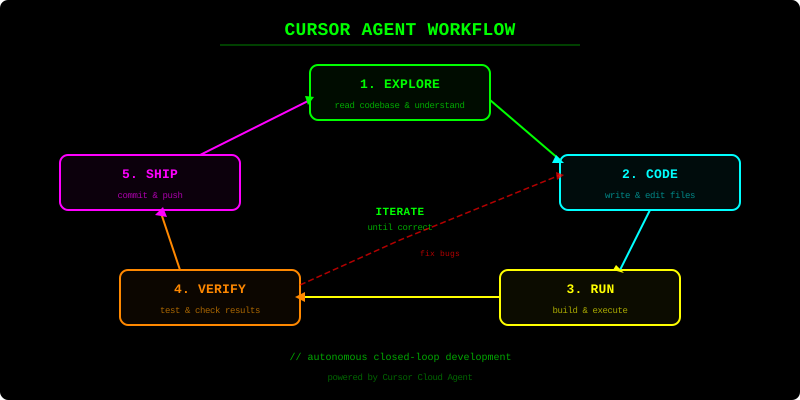
How This Blog Section Was Created
Here is what the agent did, step by step:
1. Environment Setup
The agent explored the repository, identified it as a Jekyll static site, and set up the development environment from scratch:
sudo apt-get install -y ruby-full build-essential zlib1g-dev
sudo gem install jekyll bundler
jekyll serve --host 0.0.0.0 --port 4000
2. Fixing Existing Issues
The original post file test-post.md did not follow Jekyll’s required YYYY-MM-DD-title.md naming convention, so it was invisible to the blog engine. The agent renamed it:
_posts/test-post.md → _posts/2026-03-05-test-jekyll.md
The homepage also had hardcoded post links instead of using Jekyll’s post.url. The agent fixed these to use proper Liquid template tags.
3. Building the Blog Section
The agent created:
blog.html— a listing page showing all posts as cards with excerpts- Navigation — added a “Blog” link to the site header
- CSS styles — post cards with glowing green borders, article typography, and styled code blocks, all matching the neon hacker theme
- A sample post — to demonstrate multi-post functionality
4. Testing
The agent opened a browser, navigated through every page, and recorded a video walkthrough to prove everything worked. It verified:
- Posts appear on the homepage and blog listing
- Clicking a post opens the full article
- Navigation between pages works
- The neon theme is consistent throughout
The Key Insight
The agent did not just generate code and hand it off — it ran the site, visually verified the UI, and iterated until the result matched expectations. This closed-loop approach (write → run → verify → fix) is what makes Cursor agents different from traditional code generation tools.
Adding Your Own Posts
Want to add a post? Just create a Markdown file in _posts/ following this pattern:
_posts/YYYY-MM-DD-your-title.md
With front matter like this:
---
title: "Your Post Title"
date: YYYY-MM-DD HH:MM:SS +0200
layout: post
---

Your content here in Markdown...
It will automatically appear on the blog listing page and the homepage. No configuration needed — Jekyll handles the rest.